An often-encountered issue in AI image generation is:
The first image looks great.
But after making some changes,
the entire image changes again.
The face switches.
The product shape distorts.
The clothing changes.
The background gets redrawn.
If you want to reference at once:
A person,
Clothing,
Shoes,
Product,
Scene,
models easily get confused.
The latest Qwen release, Qwen-Image-2.1,
aims to solve precisely these issues.
What is Qwen-Image-2.1?
It's Qwen's newest:
Image Generation + Image Editing Model.
Unlike common setups where:
one model handles generation,
while other tools do:
background removal,
inpainting,
and local edits,
Qwen-Image-2.1 integrates many tasks into:
a single model.
Its core capabilities listed by the official team include:
- Text-to-Image generation
- Editing existing images
- Multi-reference image editing
- Local editing
- Transparent image generation
- Subject extraction
- Text rendering
- High fidelity for portraits and products
So, it feels less like:
"Generate a beautiful picture from one prompt."
and more like:
a complete image creation tool.
The most practical feature: Up to 10 Reference Images
This is likely the most notable point for general creators.
Qwen-Image-2.1 supports up to:
10 reference images at once.
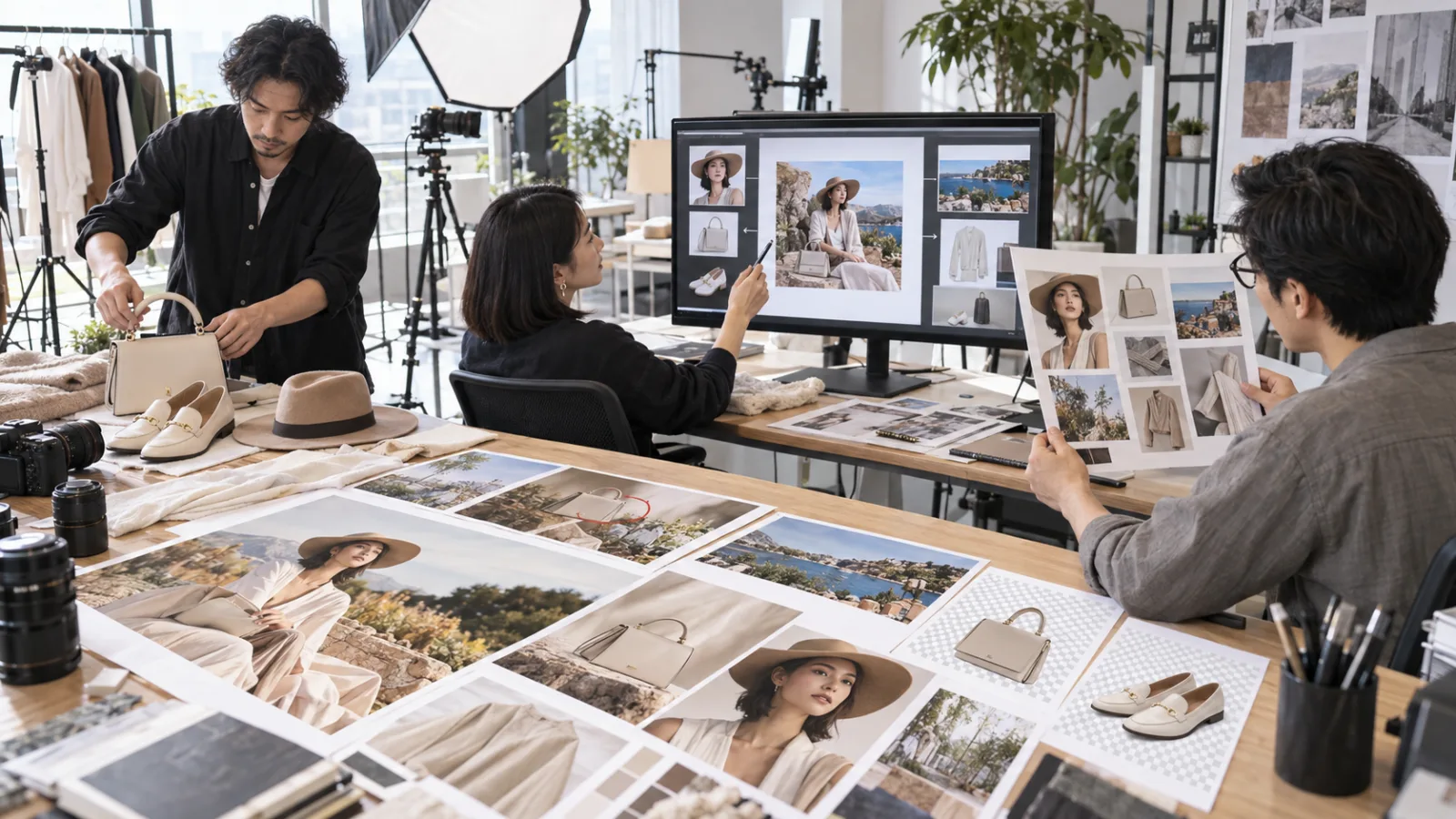
For example, when creating a brand image,
you can provide separately:
Image 1: person
Image 2: top
Image 3: pants
Image 4: shoes
Image 5: bag
Image 6: hat
Image 7: shooting scene
Then ask the AI to:
combine these elements into a complete photo.
In official demos, they even combined:
person,
clothing,
shoes,
bag,
hat
from different images into one full outfit.
This is very different from the old way of:
providing just one reference image and describing other elements by text.
Why are multiple references important?
Because text alone may not accurately preserve:
product proportions,
individual features,
clothing details,
and brand designs.
For example, if you tell the AI:
“black leather handbag,”
it might generate a plausible black bag.
But what you really want is:
this specific product.
Here, the value of reference images is much higher than text.
The practical workflow gradually becomes:
person reference + product reference + clothing reference + scene reference + text instructions.
Rather than guessing everything solely from a prompt.
Second feature: Modify only specified areas, not the whole image
Qwen-Image-2.1 also supports:
local editing.
You can use:
circles,
painted annotations,
or masks
to specify which areas to change.
For example, in a portrait:
circle the watch and request:
“remove the watch.”
circle the hair and request:
“change to dark brown.”
select the clothing and request:
“change to off-white shirt.”
The real goal isn’t to have the AI:
generate another “similar person.”
but to:
limit the modification scope.
This is more practical for:
product images,
portrait shots,
ads,
and social media graphics.
But specifying "only this area" doesn’t guarantee pixel-perfect unchanged elsewhere
This is a reality check.
Image generation models inherently re-infer images.
The goal of local editing is:
better control over modification areas,
not guaranteeing that every pixel outside these areas remains bit-for-bit identical.
So for use cases involving:
logos,
precise product packaging,
legal documents,
medical images,
or any design elements requiring complete fixation,
you should always:
re-validate after editing.
Don’t assume other regions remain unchanged just because you marked a mask.
Third feature: Direct transparent background generation
This function is very practical.
Qwen-Image-2.1 natively supports:
RGBA transparent images.
Meaning images can include an:
alpha channel.
Simply put:
background can be directly transparent.
For example, you can generate:
stickers,
product assets,
cutouts of people,
presentation illustrations,
website icons,
or video overlay elements.
Previously common workflows were:
generate image → use another tool to remove background → refine edges → export PNG.
Now the model handles:
transparency during the generation phase.
Extract subjects directly from existing photos
Transparency isn't just for generation from scratch.
The official also explicitly lists:
subject extraction.
For example, with a photo of a coffee cup on a table,
you can ask the model to:
keep the coffee cup,
remove the background,
and output a transparent asset.
This is very useful for:
e-commerce,
advertising,
presentations,
and social media design.
Because many tasks actually spend more time on:
organizing assets into usable formats than creating an artistic image.
Fourth feature: Native 2K resolution support
The official native resolution listed is:
2K.
For example, 1:1 ratio at:
2048 × 2048 pixels.
It also provides recommended dimensions for:
4:3,
3:4,
3:2,
2:3,
16:9,
and 9:16.
This is handy for content creators,
since one model can handle:
Instagram square,
website 16:9,
reels/shorts 9:16,
vertical posters,
horizontal ads,
without needing to first generate square images and then crop.
7B parameters doesn’t mean the entire system is only 7B
The official emphasizes:
7 billion parameters.
But the full picture is:
7B refers to the:
Visual Generation Component,
the core image generation transformer.
Qwen-Image-2.1 also uses:
Qwen3-VL 8B
as its text encoder, responsible for understanding:
text instructions
and reference images.
So don’t simplify “7B Visual Generation Component” as:
the entire system only having 7B parameters.
More accurately, Qwen aims to keep the main image generation compact while enabling multi-reference and editing capabilities.
Why design a smaller core model?
Image models face a practical challenge:
The stronger the model, the more GPU resources it consumes.
If every generation, editing, or multi-reference step requires massive compute,
deployment costs become high.
Qwen-Image-2.1 uses:
Mixed-granularity Attention
and
Prefix KV Cache Reuse.
Especially for multi-image editing, reference images and text context don’t need full recalculation at each denoising step.
In simple terms:
don’t reprocess already seen references repeatedly.
The goal is to reduce redundant computation.
If your prompt is too short, Qwen even provides AI to help rewrite it
Another interesting feature is:
Qwen released two separate:
Prompt Rewriting Models.
One tailored for:
Text-to-Image generation,
and another for:
Image editing.
For instance, if you only write:
“Change the sky to sunset,”
the prompt rewriter expands it into a fuller description covering:
which areas to edit,
how the sunset light looks,
which subjects to preserve,
and output ratios.
In other words:
one AI organizes your request before passing it to the image AI.
This direction is worth noting because typical users don’t need to memorize dozens of prompt techniques.
A layer of:
instruction translation
can be added before the model.
Where can you use it now?
The most direct ways currently are:
If you just want to try it,
the official repository offers a Hugging Face demo link.
ModelScope also supports:
online generation.
If you have your own GPU,
you can use:
Diffusers.
Qwen-Image-2.1 got day-0 support upon release.
If you prefer visual workflows,
you can use:
ComfyUI.
ComfyUI natively supports text-to-image and image editing from day one of release.
So it’s not just:
“weights released, good luck,”
the ecosystem tools are synced and ready.
Do average users need to set it up themselves?
Not necessarily.
If you just want to:
test effects or
generate images occasionally,
it's easier to use online demos first.
Local deployment suits people who want to:
control workflows,
generate in bulk,
research the model,
manage assets,
or are already familiar with ComfyUI or Diffusers.
Running locally means handling:
GPU VRAM,
Python environments,
model weights,
storage,
and inference settings.
Therefore, “public weights” doesn’t equal:
just download an app and run it immediately.
The biggest reminder: public weights don’t mean free commercial use
This is the most important point today.
Qwen calls Qwen-Image-2.1 an:
open-source image generation model.
Its weights are publicly downloadable.
But it’s not under commonly known licenses like:
Apache 2.0.
Instead, it is under:
Qwen Research License Agreement.
This license explicitly states:
current authorization is for:
non-commercial research and evaluation only.
If you want to use Qwen-Image-2.1 materials for commercial purposes,
you must obtain a:
commercial license.
So:
you can download the model,
but that does not mean:
you can directly use it to create commercial products for clients.
These two are distinct issues.
Does that mean generated images can’t be commercially used at all?
Don’t oversimplify here.
The main restriction of the official license targets:
Qwen materials
and commercial uses leveraging those materials.
But actual commercial use of a generated image might also involve:
which service you used,
its own terms,
rights of reference images,
portrait rights,
trademarks,
and copyrights.
So the safest approach is to not assume:
“open-source” means
all output is freely usable commercially.
If you plan to include outputs in:
paid services,
client projects,
commercial products,
or large-scale API workflows,
confirm carefully:
what license applies to the model and platform you are using.
What really matters about Qwen-Image-2.1 isn’t benchmark scores
The most practical features of this tool boil down to four points:
Multiple references
so AI doesn’t only guess person, product, and style from text.
Local editing
to restrict changes more precisely.
Native transparency
to avoid extra background removal steps.
Unified model
so you don’t switch models for each step.
This shows AI image tools are transitioning from:
“Help me generate a nice picture.”
towards:
“Help me complete an entire image creation workflow.”
For actual content creators,
the latter is far more valuable.
Today, let's grow alongside AI.
Learn one AI skill every day.
Save a little time daily.
Improve your abilities bit by bit.
SasaDaily, growing with you.